Use AI for LinkedIn comments while keeping the final say.
LinkedIn Co-Pilot gives creators a fast first draft for comments, then leaves the judgment to you. It helps with wording, tone, and structure without crossing into auto-posting.
AI drafts. Human review. Manual posting.
Answer in brief
An AI LinkedIn comment generator should help you respond faster without replacing your judgment. LinkedIn Co-Pilot drafts comments from the post context, then lets you adjust tone, edit the draft, and post manually.
Multiple models
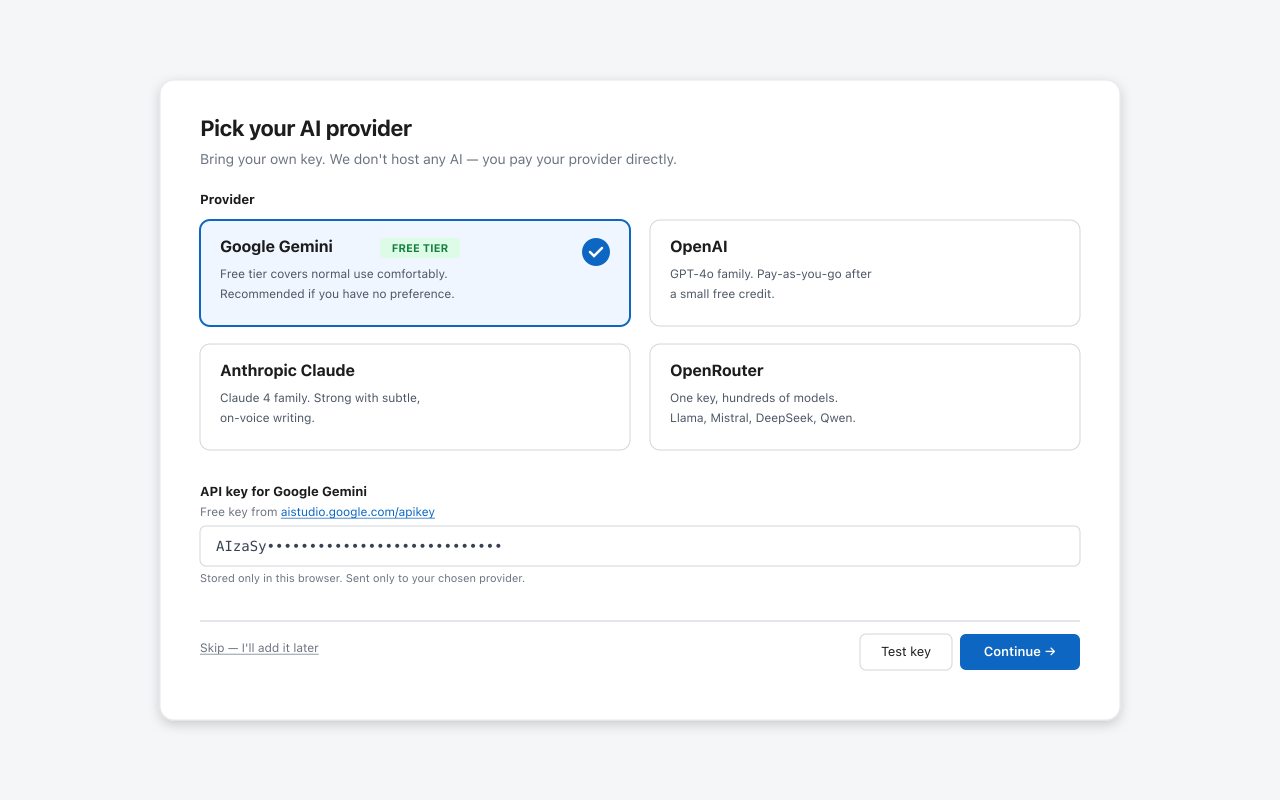
Use Gemini, OpenAI, Claude, or OpenRouter depending on the draft style and cost you prefer.
BYO key
You use your own AI provider key instead of sending every request through a hidden shared account.
Creator control
Every generated line is a suggestion, not a published comment.
Good AI comments still need taste
The best LinkedIn comments usually add a real perspective: a useful example, a respectful disagreement, a question, or a concise takeaway. Co-Pilot is designed to help you get to that point faster, not flood posts with generic praise.
Frequently asked questions
Which AI providers does LinkedIn Co-Pilot support?
LinkedIn Co-Pilot supports Google Gemini, OpenAI, Anthropic Claude, and OpenRouter.
Is this a LinkedIn automation tool?
No. It drafts text only. It does not post, like, follow, message, or scrape LinkedIn at scale.
Where is my API key stored?
Your API key is stored locally in your browser through Chrome storage.
Try AI comment drafts with manual control.
Install the Chrome extension free, or join the Pro waitlist for launch updates.
Add to Chrome - Free