Comment on LinkedIn in your own voice — not the AI's.
Bring your own AI key. Co-Pilot reads the post, drafts a one-line comment that sounds like you, and you copy-paste. Drafts only — never posts on your behalf.
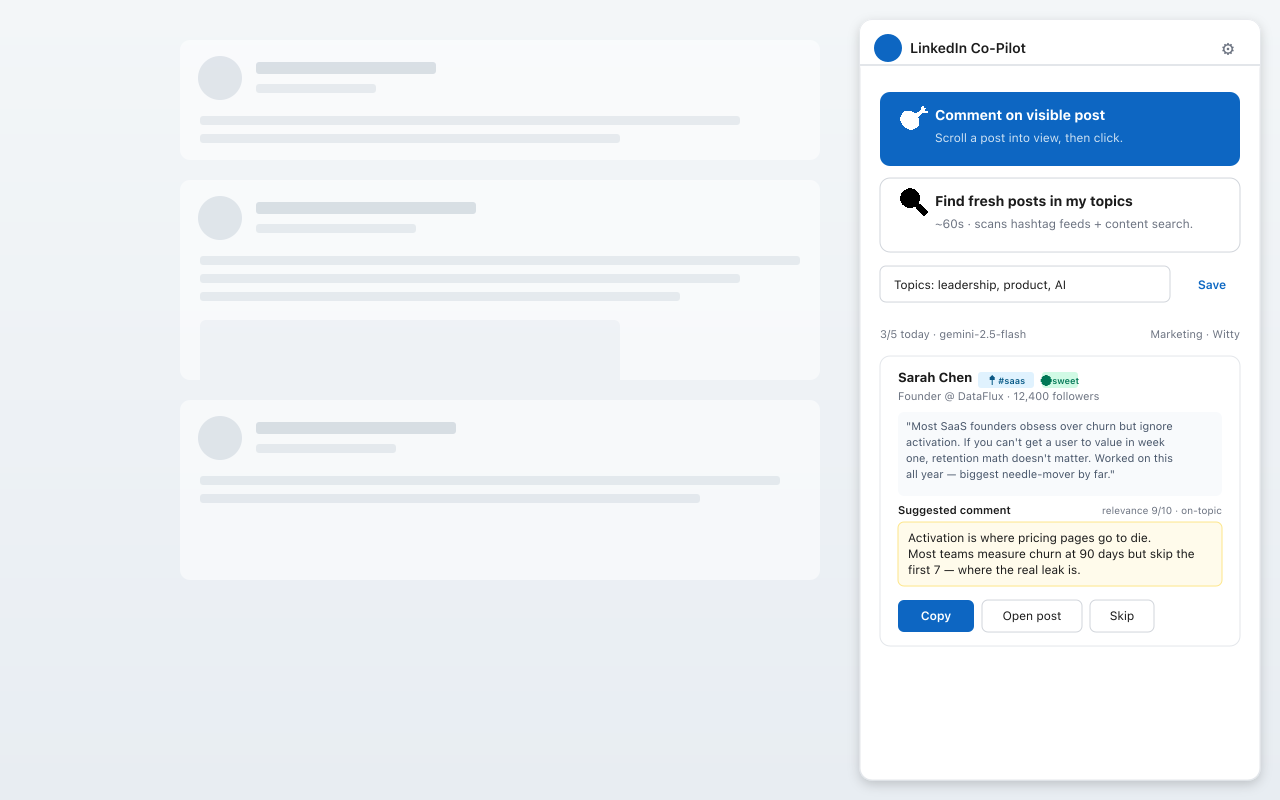
Bring your own AI key. Co-Pilot reads the post, drafts a one-line comment that sounds like you, and you copy-paste. Drafts only — never posts on your behalf.
From clicking a LinkedIn post to a thoughtful comment in your voice — start to finish.
Only 3% of LinkedIn's 1.3 billion members post weekly. Almost nobody comments well. That's the gap — and it's where personal brands actually get built.
In the first 90 days, comments matter more than your own posts. These three formats compound.
Bring a perspective the original author didn't cover. The author engages, their audience notices, the algorithm rewards depth.
Push back on the take with a specific counter-point from your own experience. Disagreement that has a "why" generates the most engagement velocity.
Link the post to a 2-line story from your own work. Concrete beats abstract. Story beats statistics. Yours beats anyone else's.
The hard part isn't knowing this. It's showing up daily, with a real point of view, in your own voice. That's what Co-Pilot makes effortless.
But AI-written comments are obvious. They open with "Great post!" They use words you'd never use. They sound like a press release. So you stop using AI — and end up not commenting at all.
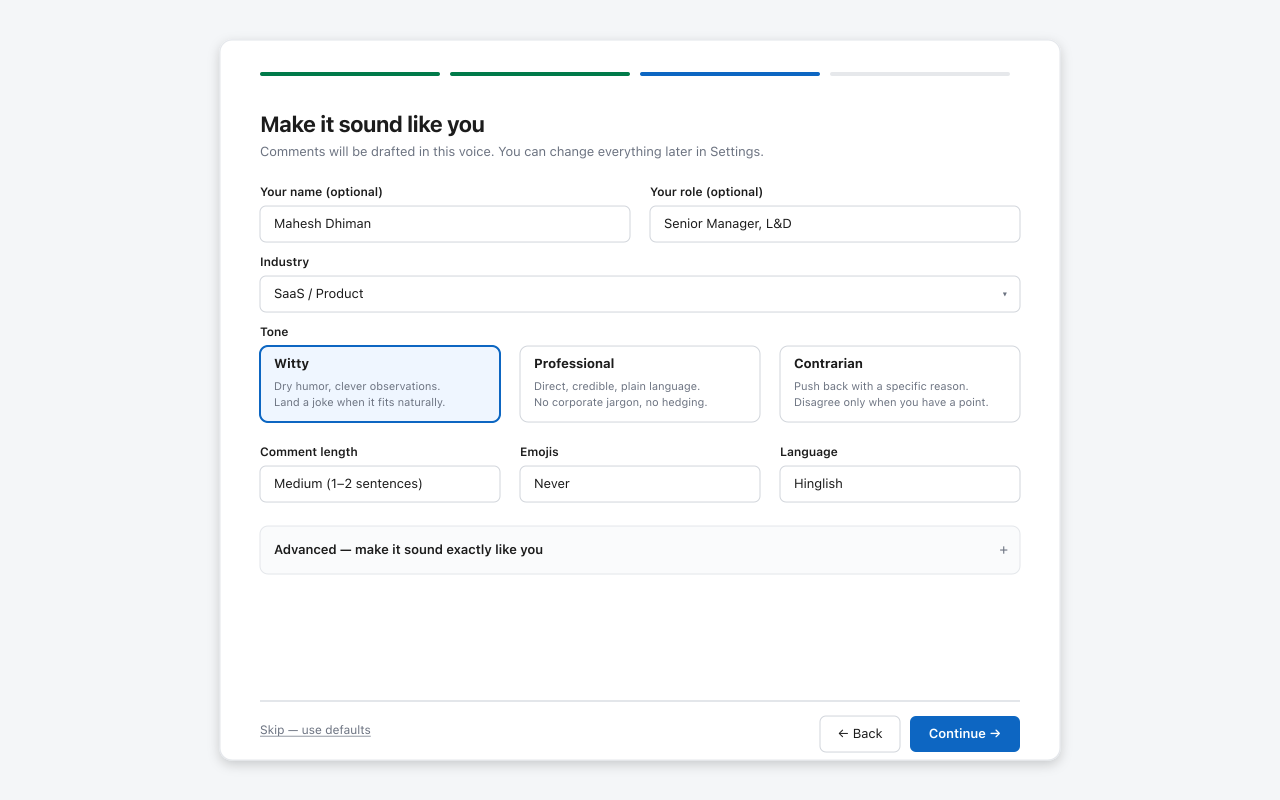
Pick your industry, tone, and length. Six tone presets — Professional, Casual, Witty, Contrarian, Supportive, Analytical. Six languages including Hindi and Hinglish. Optional: capture your real voice from your LinkedIn profile.
Open the side panel, click Comment on visible post. Co-Pilot reads the post and drafts a comment in your voice — short, opinionated, no "great post" nonsense. Or use Find fresh posts in my topics to surface five timely posts worth engaging with.
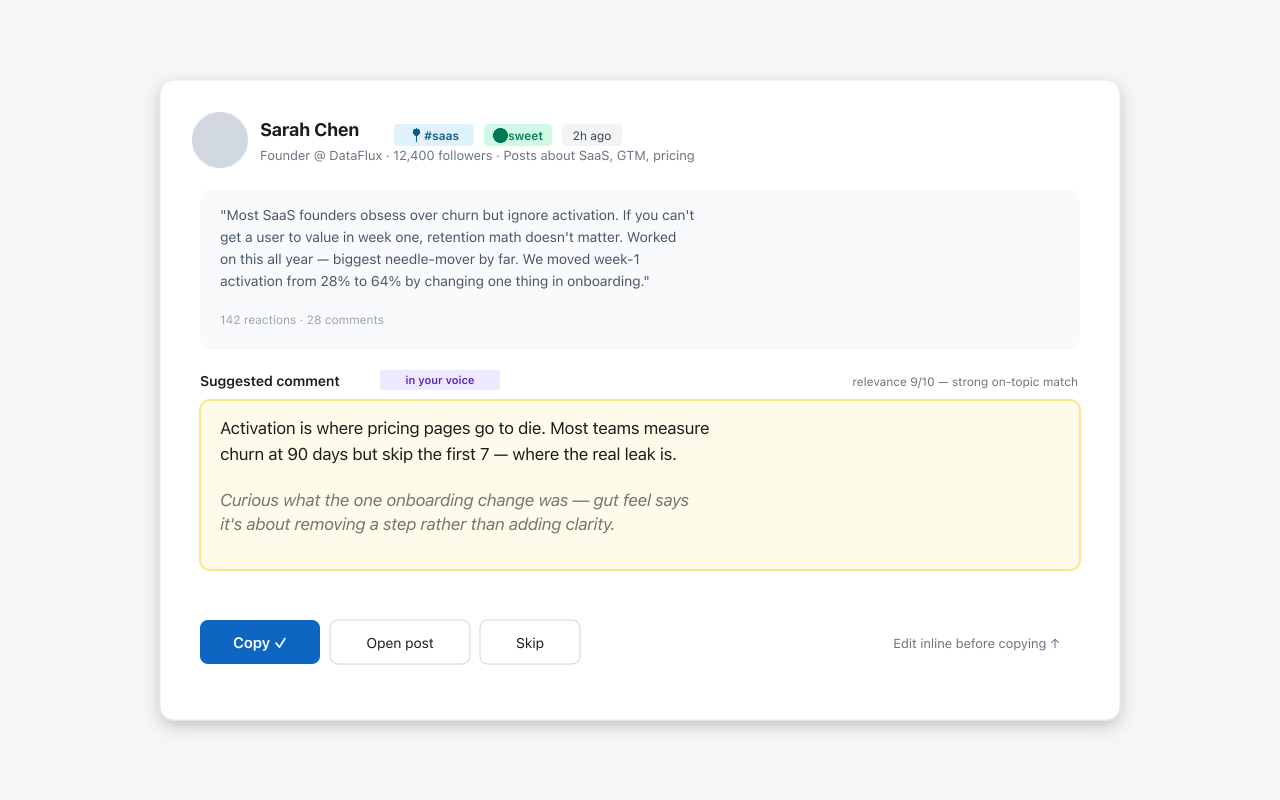
Tweak the draft inline if you want. Click Copy. Paste into LinkedIn yourself. Co-Pilot never posts on your behalf — drafts only. Compliant with LinkedIn's terms, and you stay in control of every word.
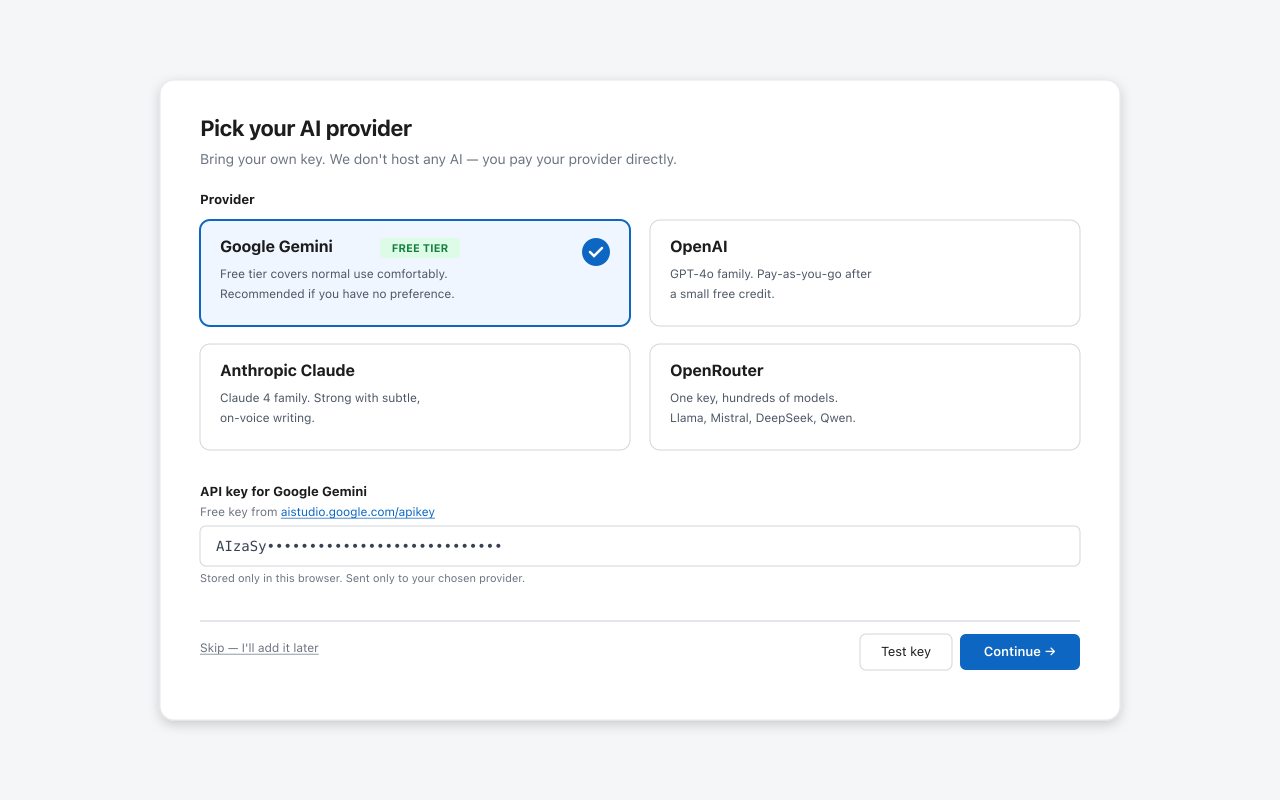
Gemini · OpenAI · Claude · OpenRouter. Pick any. We don't host any AI — you pay your provider directly.
6 tone presets + style controls + optional voice scan from your own LinkedIn profile.
Your API key, voice profile, settings, and drafts stay in your browser.
We never post on your behalf. LinkedIn-ToS-safe. You copy and paste manually, every time.
Scrapes hashtag feeds + content search to surface posts in topics you actually care about.
English, Hindi, Hinglish, Spanish, French, Portuguese — comment in the language your audience reads.
Your drafts, settings, API keys, and voice profile stay in your browser.
Your API key is sent only to your chosen AI provider. Stored only in your browser.
You review and post every comment yourself. We never automate posting.
100% free during launch — no credit card. After we hit 500+ installs, we'll add an optional Pro tier. Early users get grandfathered in at the launch price.
No. Co-Pilot drafts comments only. You review, copy, and paste them into LinkedIn yourself, every time. This is by design — it keeps you compliant with LinkedIn's terms and in control of every word that goes on your profile.
No. Your API key, voice profile, and extension settings are stored only in your browser via chrome.storage.local. Post text is sent only to your chosen AI provider at the moment a comment is being drafted, using your API key. If you join the Pro waitlist on this website, we store only the email address you submit for product updates.
For most users, nothing. Google offers a generous free tier at aistudio.google.com/apikey that covers normal use comfortably. If you exceed the free tier, you pay Google directly — never us.
No. Because Co-Pilot only drafts comments and you copy-paste them yourself, LinkedIn sees normal manual activity. We don't automate posting, scraping, or any action that violates LinkedIn's user agreement.
Yes. In Settings, pick any of the four supported providers — Google Gemini, OpenAI, Anthropic Claude, or OpenRouter (Llama, Mistral, DeepSeek, Qwen, and more). Your keys for each provider stay saved, so you can switch back any time.
Chrome only for now. Microsoft Edge works since it's Chromium-based. Firefox and Safari support are on the roadmap if there's demand.
Because building paid features before knowing if anyone wants the product is wasted work. Phase 1 is free, broad, and meant to validate demand. If the product proves itself, we add a Pro tier in Phase 2. Early users grandfather in.
Solo built by Mahesh Dhiman (@mdpixx on LinkedIn). Reach out via info@linkedincopilot.app with feedback, bugs, or feature requests.
Short guides for creators who want better comments, consistent voice, and manual control over every LinkedIn interaction.
How to draft thoughtful comments for visible LinkedIn posts without auto-posting.
Use Gemini, OpenAI, Claude, or OpenRouter for comment drafts while keeping final control.
Draft beside LinkedIn in Chrome instead of switching between separate writing tools.
Use tone, length, language, and formality controls to avoid generic AI copy.
Build visibility with better comments, not mass engagement or hidden automation.
Why LinkedIn Co-Pilot stays draft-first, privacy-first, and manual by design.
Free Chrome extension. Bring your own AI key. Drafts only — never posts.
Add to Chrome — Free →Free during launch · Bring your own AI key · Drafts only — never posts on your behalf.
If it saves you time, a 5-star review on the Web Store helps the next person find it.